Fuse Bead Pattern Maker for Artkal S, C and M beads
Beadalia is a fuse bead pattern maker: you design on a square pegboard grid and every cell is a real Artkal colour. It supports Artkal S, C and M catalog colours, you can turn an image into a fuse pattern, and the result stays editable afterwards.
Free to draw, no account needed. A new canvas opens as Fuse Beads on Artkal S; an existing canvas keeps its family.
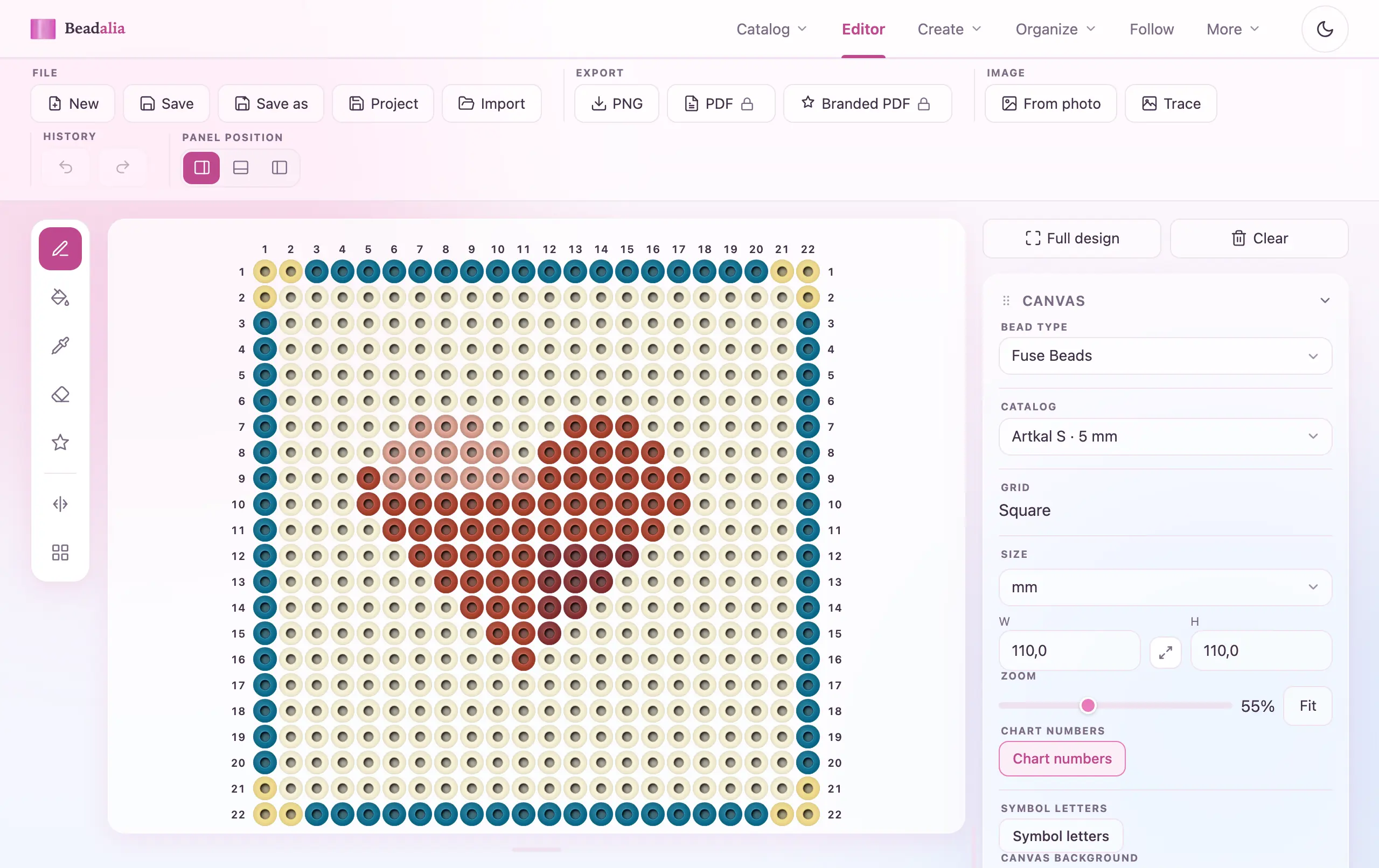
Design on a square pegboard grid
Fuse patterns use a square grid. A pegboard's pitch is the same on both axes, so a cell in the editor is exactly as wide as it is tall — the picture on screen is the piece you will lay out on the board. Nothing is stretched to fit and nothing has to be mentally corrected.
A fuse canvas has no stitch. A fuse bead is placed on a board and melted: there is no thread, no needle and no row of loops to name, so the stitch selector is simply not part of this family. That is the difference from the seed bead pattern maker, where a Miyuki Delica cylinder is wider than it is tall and the stitch decides how the rows sit against each other.
Open a fuse canvas
Go to the editor and set Bead type to Fuse Beads. Pick the Artkal series you are beading with — S, C or M.
Paint from the Artkal catalogue
Add colours by their official Artkal code and paint cell by cell. The bead counts update while you work, per colour and in total.
Export or follow it
PNG export is free with no account. Follow reads the pattern back to you row by row while you place beads.
Turn a photo into a fuse bead pattern
Image conversion maps every cell to a colour from the real bead catalog selected on the canvas. Open a fuse canvas on the Artkal series you own, then convert: each cell comes back as an actual Artkal code, not an anonymous colour you would have to match by eye afterwards.
You set how wide the piece should be in beads, how many colours it may use, and whether the background is removed. The full preview — the whole grid, every code — is free and needs no account. Writing that grid onto the editor canvas is Pro (€70/year). The image to bead pattern page covers every setting in detail.
Real Artkal colours, from the published charts
Fuse beads are sold by brands such as Artkal, Perler and Hama. Beadalia supports Artkal S, C and M catalog colours: three ranges with their own code systems, taken from the manufacturer's own published RGB charts rather than sampled from photographs.
Artkal S
5 mm Midi · 225 colours, 173 with a published RGB value
Artkal C
2.6 mm Mini · 197 colours, 172 with a published RGB value
Artkal M
2.6 mm Mini · 221 colours, 220 with a published RGB value
A colour without a published RGB value is listed but never chosen by the image converter — an approximation there would put a colour nobody measured into your pattern. Browse the ranges in the Artkal catalogue, or build a scheme from them with the fuse palette generator.
Beadalia is independent. Artkal is a trademark of its owner; this project is not affiliated with, sponsored or endorsed by Artkal, and the same is true of every other brand named on this page.
Edit and clean up the pattern
Converted patterns remain editable. In the preview you can replace one colour everywhere it appears, or change a single bead, choosing from Artkal codes near the one you are replacing. Nothing is baked in at conversion time.
Merge rare colours
On by default. A code used by only a handful of cells folds into its nearest neighbour, so you are not buying a whole pack of a colour that appears five times.
Remove the background
Turns a flat backdrop into empty cells, so the piece is the subject and not a rectangle. Useful for a keyring or a magnet.
Keep editing on the canvas
Once the grid is on the editor canvas you recolour it like any design you drew by hand — the converter does not produce a locked result.
Follow the pattern while you bead
Users can follow patterns and track progress. Follow walks the design row by row — enter, space, a tap or the arrow keys move you on — and remembers where you stopped, so a board you put down in the evening opens on the same row the next day.
It is free and needs no account. On a pegboard both your hands are placing beads rather than holding a needle, which is why moving on does not require picking the device back up.
Save, sync and organise your designs
A local draft is kept in the browser while you work, with no account and no cap. You can save up to five named designs on the free plan without signing in at all; an account adds cross-device sync and the personal PDF, and Pro lifts the five-design cap. Inventory records the Artkal colours you already own, and the editor lists how many beads of each colour a pattern needs.
What is free, and what Pro adds
Drawing, the Artkal catalogue, the bead counts, PNG export, inventory, Follow and up to five saved designs are free and work without an account. A free account adds cross-device sync and the personal PDF. Pro lifts the five-design cap and adds applying a converted image, the shop-branded PDF and production cost — €70/year.
Free — no account
Miyuki Delica and Artkal catalogs · Pattern editor, every stitch · Inventory and shopping lists · Import quantities from an invoice · Follow a pattern row by row · PNG export · Up to 5 saved designs
Free account — costs nothing
Cross-device sync · Personal PDF export · One free photo-to-pattern conversion
Pro — the paid plan
Unlimited saved designs · Additional photo-to-pattern conversions · Branded PDF with your shop details · Production cost · Profit and margin
Fuse bead patterns, in short
What is a fuse bead pattern maker?
It is a tool for designing the grid you will lay out on a pegboard. You paint a square grid where each cell is one fuse bead in a real catalogue colour, and it gives you back the bead counts and a chart you can work from. Beadalia does this for Artkal S, C and M colours, either by drawing directly or by converting an image.
What size should a fuse bead pattern be?
Measure it in beads, not millimetres — the pattern is a grid, and how big it ends up depends on which bead you use. The image converter accepts 1 to 300 beads on each side. Detail is a question of width: below about 35 beads across, small features such as an eye are narrower than a single cell and cannot survive. With Remove background on, the converter says so before you commit.
Can I use Artkal colours in the pattern maker?
Yes. Beadalia supports Artkal S, C and M catalog colours, with each series taken from the manufacturer's published RGB chart. You paint by official Artkal code, and image conversion picks only from colours Artkal has actually published a value for.
Can I edit a generated fuse bead pattern?
Yes. Converted patterns remain editable. In the preview you can swap one colour everywhere or change a single bead; once the grid is on the editor canvas you recolour, resize and redraw it exactly as you would a pattern you started from scratch.
Ready to make a fuse bead pattern?
Open a square pegboard canvas on real Artkal colours — no account needed to draw.
Open the fuse bead editorRuns in the browser. No install.